
You can interact with multiple pieces of geometry based on the position of objects. In this case we are creating a field of vertical lines whose height is based on the distance form an object.
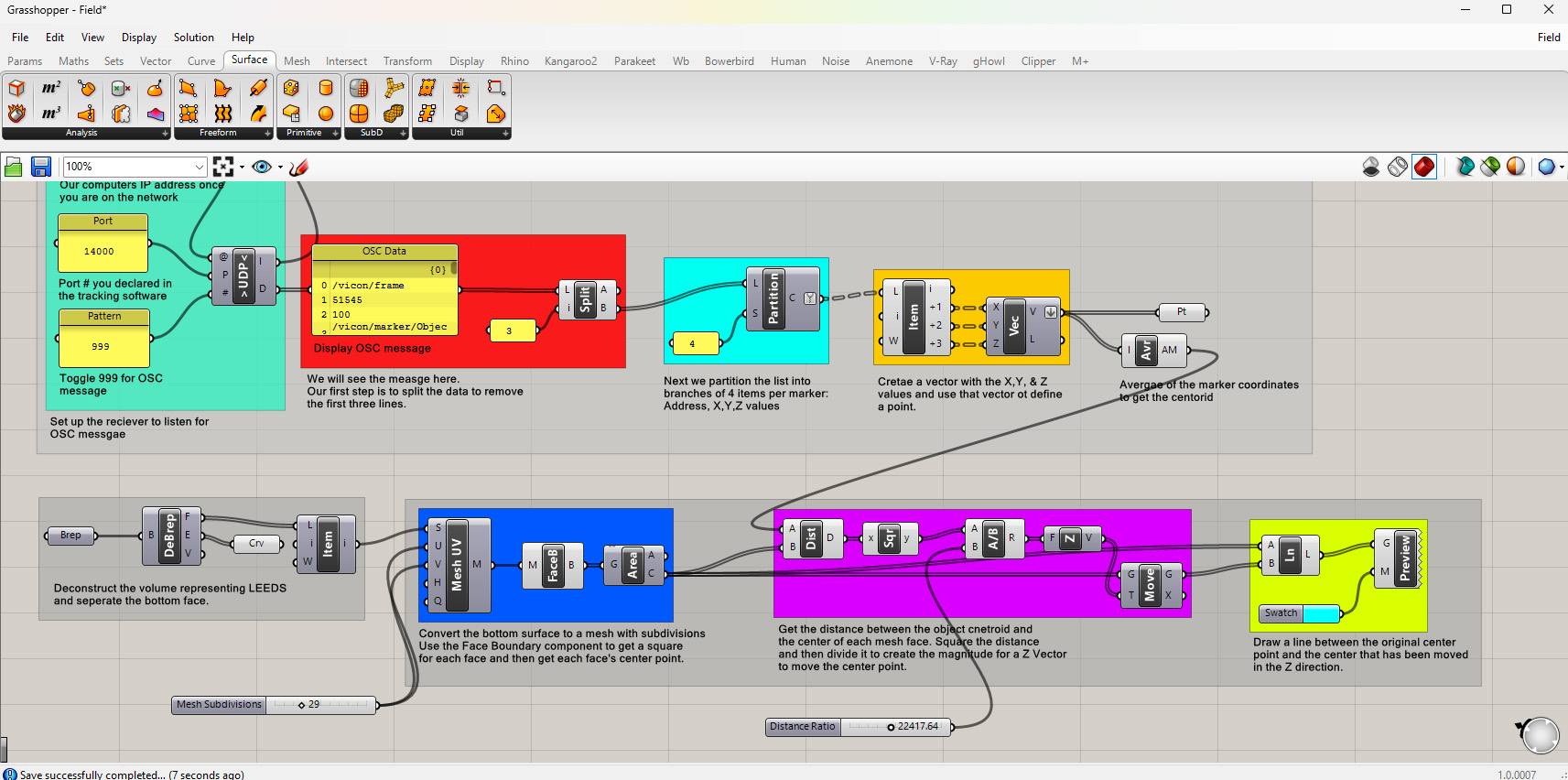
1. Use the Average component to get the average of the marker coordinates. This will give you the centroid of the object.
2. Get the base surface of the Leeds volume using the Deconstruct Brep component and List Item to get the bottom surface.
3. Convert that surface to a mesh using the Mesh Surface component where you can control the subdivisions.
4. Get the boundary of each face using the Face Boundaries component and the center of each face using the Area component.
5. Use the Distance component to get the distance between the centroid and the center of each face. From there you can use any number of the math components to adjust the distances.
6. Plug the distance into a Z Vector component and into the vector input for the Move component. Then plug in the original face center to the move component.
7. Use the Line component to create a line between the original center and its corresponding point that has been moved vertically based on the distance from the object.
Download the above definition here: Field