
You can also use a marker position, rotation, or speed to act as a conditional or switch. Conditionals typically result in Boolean values of true or false. If the condition is met then the value is true and if not then it is false. The condition can be if one value is greater than, less than, or equal to another along with a number of other conditions. In this case you can think of your object as a switch to turn things on or off or cycle between outcomes.
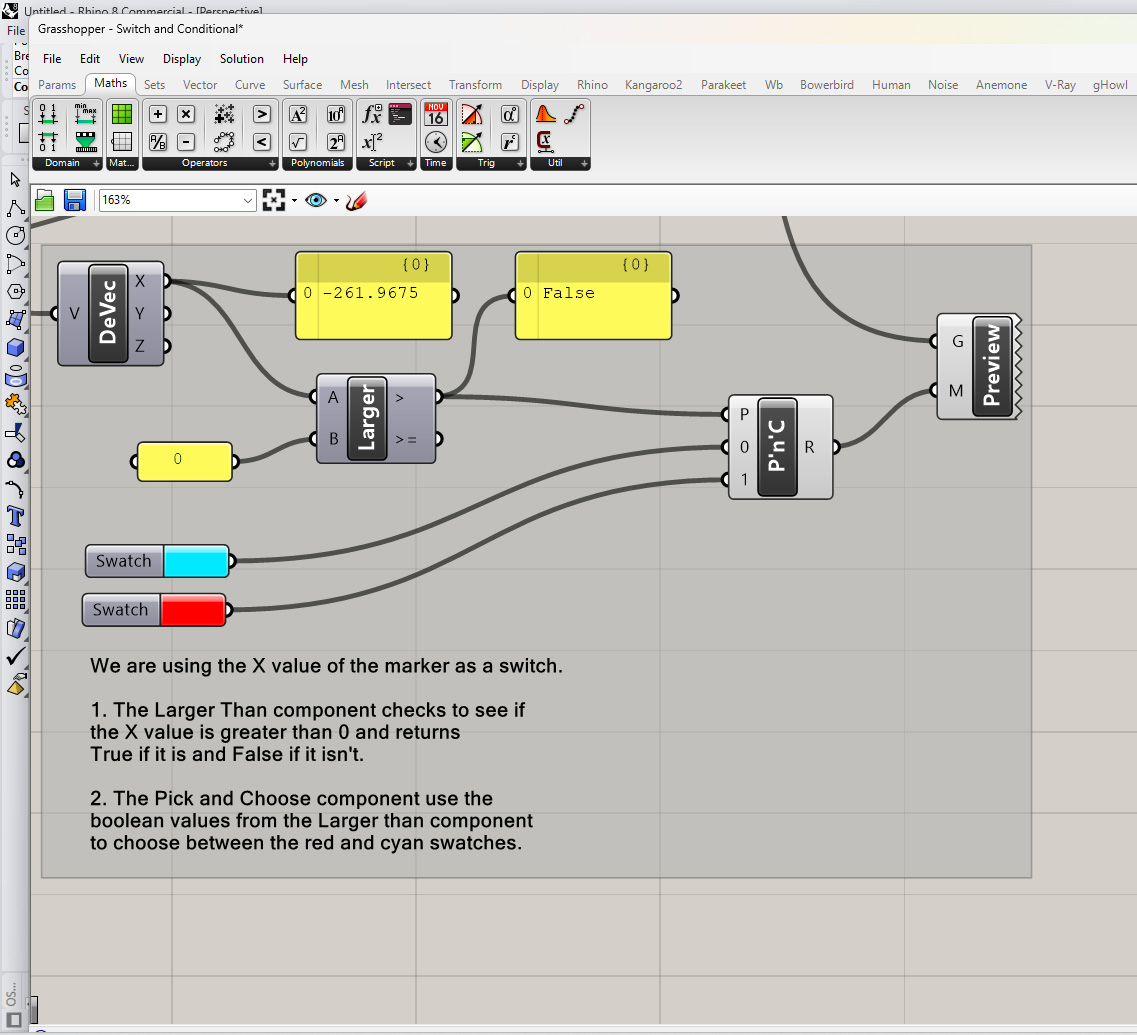
The definition above you a greater than component to test if the X coordinate of the marker is greater than 0. One side of Leeds studio is negative and the other is positive so depending on where the object is in relation to center of the room, this component will return a true or false value. That value is plugged into a Pick and Choose component. The PnC component takes two other inputs that it will choose from based on the pattern (true or false) that is plugged into the pattern input. Two swatches are plugged in and then used to preview the base surface of the volume representing Leeds. The color of this surface will switch between the two swatches depending on the position of the marker along the X axis.
Download the above definition here: Switch and Conditional